As explained in my previous post I am going to build an application to demonstrate what Allors is and how to use it. I will hopefully have to time to build the same application later on using NHibernate to show both frameworks differences.
The application I'll be building will take care of the invoicing for a contractor. It is built using the YAGNI principle (this basically states if you think you need to add complexity to your domain model, you should defer it until the moment you actually need it. Probably you ain't gonna). Lets discuss the domain shall we. The most important class obviously is the Contract signed between a Customer and a contractors's Company. Both the customer and the company are subclasses of the corporation class, which gives them some common attributes (like Name, Address, Account, .... ). On the Contract you can then register the hours you worked for them and eventually generate an Invoice for a specific period.
All relations and classes are shown in the following model:
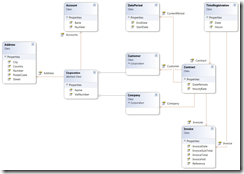
I deliberately kept everything as simple as possible so I can make future improvements to demonstrate what this means in terms of database upgrades, refactorings possibilities, etc.... If you want to follow everything that is explained here below, you can download the complete solution here or built everything yourself of course.
Building the domain (Allors)
To start building an Allors domain you first need to download the binaries and the Allors Repository. You can either checkout the sources from the subversion (https://www.allors.com/svn/platform) or you can download the Quick Start file I've put together. The zip contains two directories & a command file
- lib: Directory containing the Allors binaries and the Allors Repository, you should extract these in your solution folder.
- Allors: Directory for the Allors Domain Files, you should extract these in your domain project folder.
- AllorsRepository.cmd: file that will startup the AllorsRepository Tool for you domain, this should be extracted in your solution folder.
Step 1: Setting up the solution hierarchy
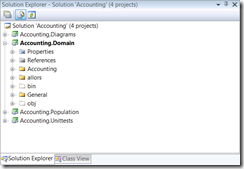
The solution structure I have applied consists of 4 projects.
- Diagrams: containing the diagrams of my domain. This project will contain only generated code with getters/setter that reflect your domain. You can then use these to generate your class diagrams.
- Domain: the heart and soul of our accounting application, you should refer to the Allors.Framework.dll here.
- Population: Helper classes to build your domain objects and setup an initial population for unit/integration testing.
- Unittests: proving our design and domain is correct and well thought.
Step 2: Creating the Allorized domain
The Allors folder from the zip file needs to be copied into your domain folder. This folder will contain the meta information (allors.repository) about your domain classes, which is built up using the AllorsRepository-Application (included in the zip file). if you modify the command file that was included in the zip file so that the parameter passed in to start up the "Allors.Repository.Application.exe" refers to the allors.repository in your domain folder, this file will now fire up the AllorsRepository-Application for your domain. You should see the following (if you are building from scratch, otherwise your domain will be completely filled in).
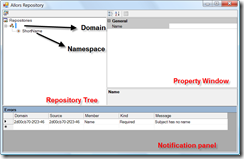
This screen has three main parts.
- The top left has a tree containing all your types and relations in your domain
- The top right is the property window of the selected treeNode
- The bottom gives information about errors in your domain
All actions are available by rightclicking the treeNode and then select the action in the context menu or change the node's corresponding properties. If you need to know how things are getting done, you can checkout the getting started page of the Allors website. On the bottom you can see that the repository already has one error. It has no name, so you need to select the domain node and fill in the name in the properties window.
Step 3: Namespaces & Types
Our solution will have two namespaces to start with. You can see here how you can add namespaces in the repository. The types we are building are shown in the diagram above, you can easily add them yourself in the allors repository. It is written out here how you can achieve that. All objects belong to the Accounting namespace, only the DatePeriod type is more generic and is placed into its own General namespaces
Step 4: Attributes & Relations
We now have domain containing single classes without any attributes or relationships between them. You cannot call this a domain of course so the logical next step to give our objects data and connect them through the use of relations. As always you can checkout here how everything can be done. The above diagram gives you all the information you need to create all the relations.
Step 5: Adding Domain Logic
The Allors domain has been built (you can download the zip file here). The next step is to generate (right click the domain and select generate) our allors classes, these will be our base classes for our domain objects. You don't have to remember to inherit any classes or interfaces because we generate a partial class for you as well. Include these files (located inside the Allors/output/folder by default, but this can be tweaked of course) in your domain project and you can start using them. Every object you instantiate now is inside a Session, the creation is performed through the Session as you can see in the next code block:
 1 public static Account Create(AllorsSession session,
 2                               string bank,
 3                               string number)
 4 {
 5       Check.Argument(number, "number").IsNotNullAndNotEmptyAndNotWhiteSpace();
 6       Check.Argument(bank, "bank").IsNotNullAndNotEmptyAndNotWhiteSpace();
 7
 8       var account = session.Create<Account>();
 9       account.Bank = bank;
10       account.Number = number;
11
12       return account;
13 }
Adding the actual business logic is done simply by adding the methods into your class (as you normally would)
 1 public TimeRegistration RegisterWorkingTime(DateTime date, Double hours)
 2 {
 3       return TimeRegistration.Create(AllorsSession, date, this, hours);
 4 }
 5
 6 public Invoice BuildInvoice(DatePeriod period,
 7                                     String reference,
 8                                     DateTime invoiceDate,
 9                                     IInvoiceCalculator invoiceCalculator)
10 {
11       VerifyThatInvoiceReferenceIsUnique(reference);
12
13       var timeRegistrations = new TimeRegistrationFinder(AllorsSession)
14                                                                 .GetNotInvoicedTimeRegistrationsFor(this,period);
15        if (timeRegistrations.Length == 0)
16        {
17            throw new ArgumentException("Invoice must contain TimeRegistrations");
18        }
19
20        var invoice = Invoice.Create(AllorsSession, reference, invoiceDate);
21        AddInvoice(invoice);
22
23       foreach (var timeRegistration in timeRegistrations)
24       {
25            invoice.InvoiceTimeRegistration(timeRegistration, invoiceCalculator);
26       }
27
28       return invoice;
29 }
Step 6: Unit Testing
Since all objects are Session aware we need to have a Session in our UnitTests. For performance reasons we will not use a real database, but rather work completely in memory. The following code creates an in-memory session for our domain.
var population = new Allors.Adapters.Memory.AllorsConnectedMemoryPopulation(new AccountingDomainConfiguration());
population.Init();
_session = population.CreateSession();
You can then create your objects with this sessions and perform the regular tests you would normally write.
 1 [TestFixture]
 2 public class When_creating_an_account : AllorsBaseTest
 3 {
 4     private AccountBuilder _builder;
 5
 6     [Test]
 7     [ExpectedException(typeof(ArgumentNullException))]
 8     public void Then_expect_an_error_when_the_number_is_null()
 9     {
10         _builder = new AccountBuilder(Session);
11         _builder.WithBank(null).Build();
12     }
13 }
The final step is to make our domain persistent.
For this I created a new project (IntegrationTests). You do not need to supply mapping files because Allors will make and initialize the database scheme for you based on the meta information you supplied. This is achieved by simply instantiating the correct population and Session, here we will use the SQL Server Express Edition. For unittesting we created the population in code (and for memory), you could as well set everything in the config file:
- First of all you need to declare the allors section in the config
- You need to configure your populations(or multiple of them) + connectionstrings
- Finally you need to create the population from based on the name in the config
 1 <configSections>
 2     <section name="allors" type="Allors.AllorsConfigurationSection, Allors.Framework"/>
 3 </configSections>
 4
 5 <allors>
 6     <populations>
 7       <add name="AccountingPopulation"
 8            type="Allors.Adapters.SqlClient.AllorsSqlClientPopulation, Allors.Adapters.SqlClient"
 9            domainConfiguration="AllorsDomains.AccountingDomainConfiguration, Pdbc.Accounting.Domain"
10            connectionStringName="accounting">
11       </add>
12     </populations>
13 </allors>
14
15 <connectionStrings>
16     <add name="accounting" connectionString="Data Source=Pdbc-Laptop\SqlExpress;Initial Catalog=accounting;Integrated Security=True"/>
17 </connectionStrings>
Then in code we can retrieve the population and instantiate the session. The Init method by the way drops the database and recreates it which makes sure that our integration tests always have the latest version of the database scheme available.
1 var population = AllorsConfiguration.GetPopulation("AccountingPopulation");
2 population.Init();
3 _session = population.CreateSession();
Check the complete sample along with the unittests for a complete overview. As you notice, the major difference with traditional POCO domain objects is that we need to inherit from an Allors Class. This Class encapsulates the access to a strategy object which contains all your class attributes and object relations. This way we can keep all objects managed by Allors which has a lot of benefits (lazy loading, managed relations, ...) , but that is for a next post.
Let me know what you think about it and have a spin with the sample.


